Learning Materials
📚 この章の学習教材
🎧 音声教材(NotebookLM)
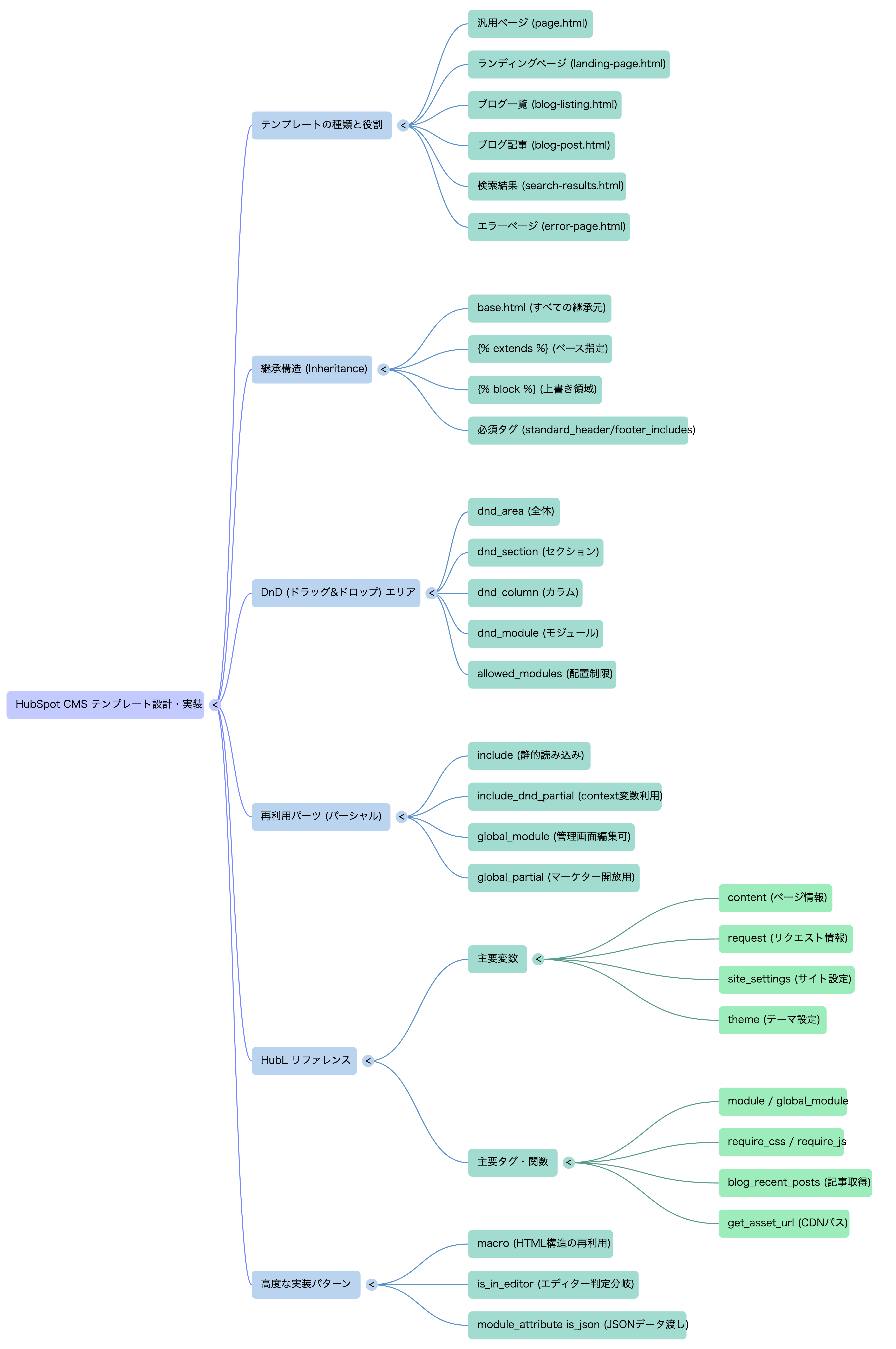
🗺️ マインドマップ
📊 図解・インフォグラフィック
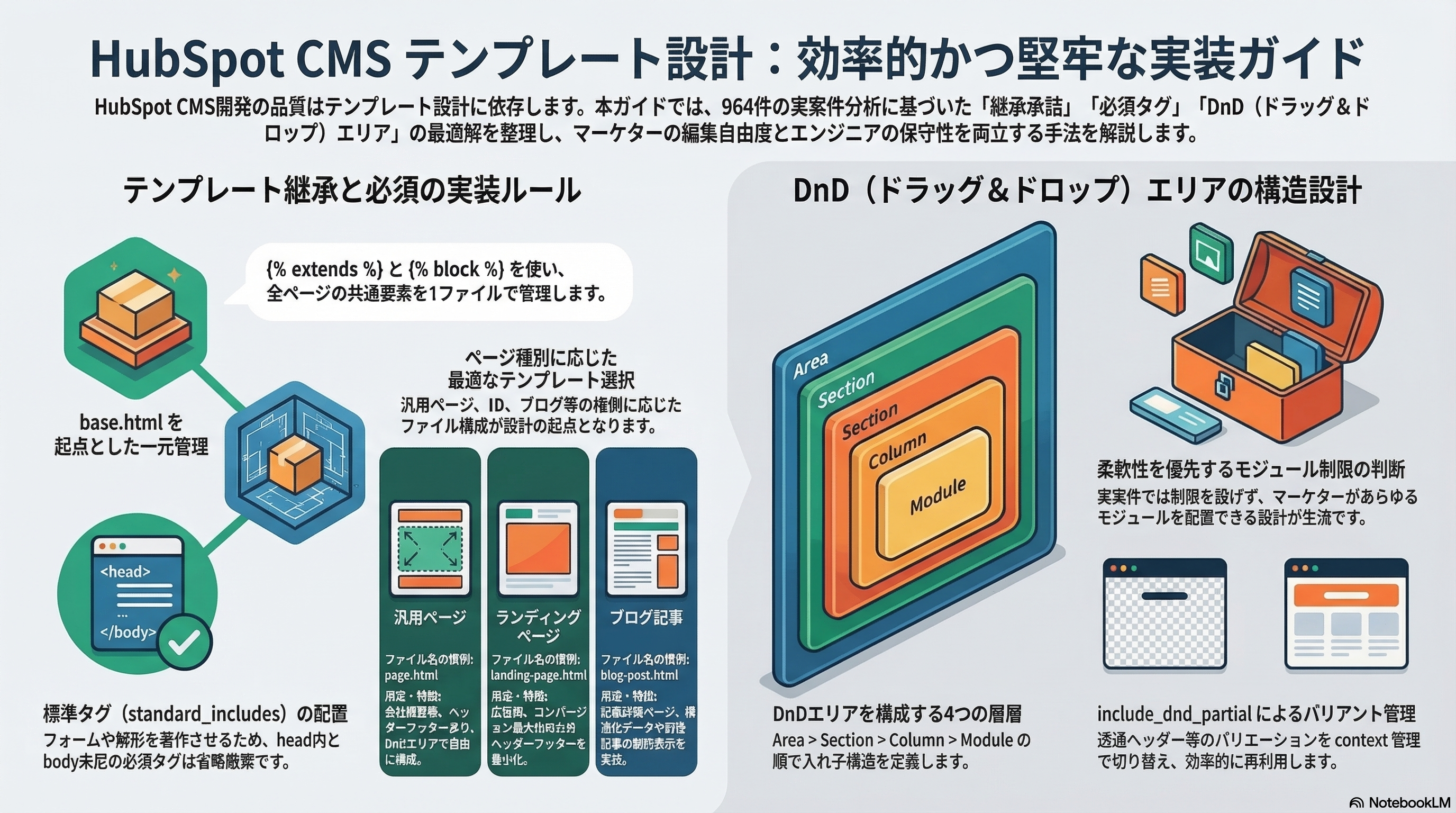
HubSpot CMS の開発は「テンプレートの設計」で決まります。継承構造・DnDエリア・パーシャルの使い分け・HubL変数の完全リファレンスから、ブログ・LP・エラーページまでの実装パターンを体系化します。実案件(964テンプレート)の分析から導いたベストプラクティスを収録。
HubSpot CMS のテンプレートはページの「骨格」を定義します。 マーケターがページを作成するとき、どのテンプレートを使うかを選択します。 テンプレートの種類と役割を最初に整理することが設計の起点です。
| テンプレート種別 | ファイル名の慣例 | 用途・特徴 |
|---|---|---|
| 汎用ページ | page.html | 会社概要・サービス紹介・採用等。ヘッダー/フッターあり。DnDエリアで自由にモジュール配置。 |
| ランディングページ | landing-page.html | 広告・キャンペーン用LP。ヘッダー/フッターを最小化またはなし。コンバージョン最大化のレイアウト。 |
| ブログ一覧 | blog-listing.html | ブログ記事の一覧表示。HubSpotブログに紐付く。ページネーション・タグフィルタを実装。 |
| ブログ記事 | blog-post.html | ブログ記事の詳細ページ。HubSpotブログに紐付く。構造化データ・前後記事・関連記事を実装。 |
| 検索結果 | search-results.html | サイト内検索結果ページ。HubSpotの検索APIと連携。 |
| エラーページ | error-page.html | 404等のエラーページ。DnDなし・シンプル構成。 |
| パスワード保護ページ | password-prompt.html | メンバーシップ・限定コンテンツのアクセス制御(Enterprise)。 |
実案件コードベースの分析では964テンプレートが確認されました。 これは複数のテーマ・クライアント・ブランドバリエーションを1つのポータルで管理している規模です。 単一サイトの一般的な構成では6〜12テンプレートが標準的です。
HubSpot CMS のテンプレートは継承(Inheritance)の仕組みを持ちます。
{% extends %} でベーステンプレートを指定し、
{% block %} で上書きする領域を定義します。
この仕組みにより、ヘッダー・フッター・headタグの変更を1ファイルで全テンプレートに反映できます。
{# ===== 親テンプレート(layouts/base.html)===== #}

<!DOCTYPE html>
<html lang="ja">
<head>
  {% block head_meta %}{% endblock %}    {# ← 子でOGP等を追加できる #}
  {{ standard_header_includes }}        {# HubSpot必須 #}
</head>
<body>
  {% block header %}
    {% include "../partials/header.html" %}
  {% endblock %}

  <main>
    {% block main_content %}{% endblock %}  {# ← 各テンプレートがここを実装 #}
  </main>

  {% block footer %}
    {% include "../partials/footer.html" %}
  {% endblock %}

  {% block extra_js %}{% endblock %}      {# ← ページ固有のJS #}
  {{ standard_footer_includes }}        {# HubSpot必須 #}
</body>
</html>

{# ===== 子テンプレート(templates/page.html)===== #}

{% extends "../layouts/base.html" %}

{# head_meta ブロックにOGPを追加 #}
{% block head_meta %}
  <meta property="og:title"   content="{{ content.html_title }}">
  <meta property="og:description" content="{{ content.meta_description }}">
{% endblock %}

{# メインコンテンツをDnDエリアで実装 #}
{% block main_content %}
  {% dnd_area "main_dnd" label="メインコンテンツ" %}
    {# デフォルトのモジュール配置 #}
  {% end_dnd_area %}
{% endblock %}
| ブロック名 | 役割 | 子テンプレートでの扱い |
|---|---|---|
| head_meta | OGP・canonical・構造化データ等のページ固有メタ情報 | 必要に応じてオーバーライド |
| extra_css | ページ固有のCSSリンクやインラインスタイル | 必要に応じて追加 |
| header | グローバルヘッダー | LPでは最小化・非表示にオーバーライド |
| main_content | ページ固有のメインコンテンツ | 必ず実装する(必須ブロック) |
| footer | グローバルフッター | LPでは最小化にオーバーライド |
| extra_js | ページ固有のJS(フォーム初期化・GTMイベント等) | 必要に応じて追加 |
base.html は全テンプレートの継承元です。
ここに書いたコードはすべてのページに影響します。
head タグ・OGP・CSS読み込み・HubSpot必須タグの配置を正確に実装することが
サイト全体の品質を左右します。
{#
  =====================================================
  base.html — 全テンプレートの継承元
  =====================================================
  【ブロック一覧】
    head_meta   : ページ固有のメタ情報(OGP・canonical等)
    extra_css   : ページ固有のCSS
    header      : グローバルヘッダー(LP等でオーバーライド)
    main_content: ★ メインコンテンツ(必ず実装)
    footer      : グローバルフッター(LP等でオーバーライド)
    extra_js    : ページ固有のJS
  =====================================================
#}
<!DOCTYPE html>
<html
  lang="{{ content.language|default("ja") }}"
  prefix="og: https://ogp.me/ns#">

<head>
  <meta charset="UTF-8">
  <meta name="viewport" content="width=device-width, initial-scale=1.0">

  {# ===== ページタイトル ===== #}
  <title>{{ content.html_title }}</title>

  {# ===== meta description ===== #}
  {% set desc = "" %}
  {% if content.meta_description %}
    {% set desc = content.meta_description %}
  {% elif content.post_body %}
    {% set desc = content.post_body|striptags|truncate(110,end="") %}
  {% else %}
    {% set desc = site_settings.meta_description|default("") %}
  {% endif %}
  <meta name="description" content="{{ desc|escape }}">

  {# ===== canonical ===== #}
  <link rel="canonical" href="{{ content.absolute_url }}">

  {# ===== OGP(共通部分)===== #}
  <meta property="og:site_name" content="{{ site_settings.company_name|escape }}">
  <meta property="og:locale"    content="ja_JP">
  <meta property="og:url"       content="{{ content.absolute_url }}">
  <meta property="og:title"     content="{{ content.html_title|escape }}">
  <meta property="og:description" content="{{ desc|escape }}">

  {# OGP画像(フォールバックあり)#}
  {% set ogp_image = content.featured_image
    |default(site_settings.favicon.src)
    |default(get_asset_url("../images/ogp-default.png")) %}
  <meta property="og:image"  content="{{ ogp_image }}">
  <meta property="og:type"   content="website">

  {# Twitter Card #}
  <meta name="twitter:card"        content="summary_large_image">
  <meta name="twitter:title"       content="{{ content.html_title|escape }}">
  <meta name="twitter:description"  content="{{ desc|escape }}">
  <meta name="twitter:image"       content="{{ ogp_image }}">

  {# ===== Organization 構造化データ(全ページ共通)===== #}
  <script type="application/ld+json">
  {
    "@context": "https://schema.org",
    "@type": "Organization",
    "name": "{{ site_settings.company_name|escape }}",
    "url": "{{ site_settings.website_url }}",
    "logo": { "@type": "ImageObject", "url": "{{ get_asset_url("../images/logo.png") }}" }
  }
  </script>

  {# ===== ページ固有メタ(子テンプレートで追加)===== #}
  {% block head_meta %}{% endblock %}

  {# ===== グローバルCSS(CDN経由・非同期読み込み)===== #}
  <link rel="preload" as="style"
       href="{{ get_asset_url('../css/main.css') }}"
       onload="this.rel='stylesheet'">
  <noscript>
    <link rel="stylesheet" href="{{ get_asset_url('../css/main.css') }}">
  </noscript>

  {# ===== theme.json の値を CSS 変数として展開 ===== #}
  <style>
    :root {
      --color-primary   : {{ theme.colors.primary_color.color }};
      --color-secondary : {{ theme.colors.secondary_color.color }};
      --color-text      : {{ theme.colors.text_color.color }};
      --font-heading    : '{{ theme.typography.heading_font.font }}', sans-serif;
      --font-body       : '{{ theme.typography.body_font.font }}', sans-serif;
      --container-max   : {{ theme.layout.container_max_width }}px;
      --section-padding : {{ theme.layout.section_padding_v }}px;
      --border-radius   : {{ theme.layout.border_radius }}px;
    }
  </style>

  {# ===== ページ固有CSS(子テンプレートで追加)===== #}
  {% block extra_css %}{% endblock %}

  {# ===== HubSpot 必須タグ(head 末尾に配置)===== #}
  {{ standard_header_includes }}

</head>

<body>

  {# ===== スキップナビゲーション(アクセシビリティ)===== #}
  <a href="#main-content" class="skip-link">メインコンテンツへスキップ</a>

  {# ===== グローバルヘッダー(子でオーバーライド可)===== #}
  {% block header %}
    {% include "../partials/header.html" %}
  {% endblock %}

  {# ===== メインコンテンツ(子テンプレートが実装)===== #}
  <main id="main-content" role="main" tabindex="-1">
    {% block main_content %}{% endblock %}
  </main>

  {# ===== グローバルフッター(子でオーバーライド可)===== #}
  {% block footer %}
    {% include "../partials/footer.html" %}
  {% endblock %}

  {# ===== グローバルJS ===== #}
  <script src="{{ get_asset_url('../js/main.js') }}" defer></script>

  {# ===== ページ固有JS(子テンプレートで追加)===== #}
  {% block extra_js %}{% endblock %}

  {# ===== HubSpot 必須タグ(body 末尾に配置)===== #}
  {{ standard_footer_includes }}

</body>
</html>
{{ standard_header_includes }}(head内)と
{{ standard_footer_includes }}(body末尾)は
HubSpotのトラッキング・フォーム・ライブチャット等の必須スクリプトを自動挿入します。
これを省略するとフォームが動作しない・解析データが取れない等の重大な問題が発生します。
すべてのテンプレートで必ず両方を含めてください。
DnDエリアはマーケターがページエディターでモジュールを自由に追加・並び替えできる領域です。 「エンジニアが設計したレイアウトの中に、マーケターが自由にコンテンツを配置できる」 のがDnDの本質です。
{% extends "../layouts/base.html" %}

{% block main_content %}

  {# ===== DnDエリア定義 =====
     label: ページエディターに表示される名前
  ===================================================== #}
  {% dnd_area "main_dnd"
    label="メインコンテンツ" %}

    {# --- デフォルトコンテンツ(新規ページ作成時の初期表示)--- #}
    {% dnd_section %}
      {% dnd_column %}
        {% dnd_module
          path="../modules/hero-banner"
          label="ヒーローバナー"
          heading="見出しを入力してください"
          subheading="サブ見出しを入力してください"
        %}
      {% end_dnd_column %}
    {% end_dnd_section %}

  {% end_dnd_area %}

{% endblock %}
{# dnd_section にはスタイルパラメータを渡せる
   ただしこれらはページエディターで上書きできる設定値であり
   固定の見た目を強制したい場合は CSS で制御する方が確実
#}
{% dnd_section
  vertical_alignment="MIDDLE"
  padding={{ {
    "top"   : { "value": 80,  "units": "px" },
    "bottom": { "value": 80,  "units": "px" },
    "left"  : { "value": 20,  "units": "px" },
    "right" : { "value": 20,  "units": "px" }
  } }}
  background_color={{ { "css": "#f8fafc" } }}
%}
  {% dnd_column %}
    {% dnd_module path="../modules/card-grid" %}
  {% end_dnd_column %}
{% end_dnd_section %}

{# ===== 2カラムレイアウトのセクション ===== #}
{% dnd_section %}
  {% dnd_column width=7 %}     {# 7/12カラム幅 #}
    {% dnd_module path="../modules/rich-text" %}
  {% end_dnd_column %}
  {% dnd_column width=5 %}     {# 5/12カラム幅 #}
    {% dnd_module path="../modules/form-section" %}
  {% end_dnd_column %}
{% end_dnd_section %}
実案件のコードベース分析では、dnd_area に allowed_modules の制限が
ほぼ設定されていませんでした。これは「すべてのカスタムモジュールをどのページにでも配置できる柔軟性」
を優先した設計判断です。
制限を設ける場合は以下のように記述します:
{% dnd_area "main" allowed_modules=["../modules/hero-banner", "../modules/card-grid"] %}
HubSpot では複数のファイル再利用方法があります。 用途に応じた使い分けが重要です。
| 方法 | HubL構文 | 用途・特徴 |
|---|---|---|
| include(パーシャル) | {% include "path" %} | テーマ内のファイルを静的に読み込む。ヘッダー・フッター等の共通HTML。管理画面からは直接編集不可。 |
| include_dnd_partial | {% include_dnd_partial path="...", context={} %} | context 変数を渡しながら include できる拡張版。バリアント(透過ヘッダー等)の切り替えに使う。 |
| global_module | {% global_module "module_id" %} | HubSpot管理画面で作成したグローバルモジュール。マーケターが管理画面から直接編集できる。 |
| global_partial | {% global_partial path="path" %} | 管理画面で編集可能なパーシャル。ヘッダー・フッターをマーケターに開放したい場合に使う。 |
実案件で特徴的だったのが include_dnd_partial に context を渡すパターンです。
同じヘッダーでも「透過」「白背景」等のバリアントをページごとに切り替えられます。
{# ===== 透過ヘッダーが必要なLP・トップページ ===== #}
{% block header %}
  {% include_dnd_partial
    path="../partials/header.html",
    context={ "header_variant": "transparent" }
  %}
{% endblock %}

{# ===== 通常ページ(contextなし → デフォルトの白ヘッダー)===== #}
{# base.html の {% block header %} がそのまま使われる #}

{# ===== partials/header.html 側の実装 ===== #}
<header
  class="site-header site-header--{{ header_variant|default("default") }}"
  role="banner">
  {% if header_variant == "transparent" %}
    {# 透過ヘッダー専用のCSS変数を上書き #}
    <style>
      .site-header--transparent {
        --header-bg   : transparent;
        --header-color: #ffffff;
      }
    </style>
  {% endif %}
  {# ... ナビゲーションの実装 ... #}
</header>
<nav
  id="global-nav"
  class="global-nav"
  aria-label="グローバルナビゲーション"
  aria-hidden="true">

  {% set nav_items = [
    { "label": "サービス",   "url": "/service"  },
    { "label": "事例",       "url": "/case"     },
    { "label": "ブログ",     "url": "/blog"     },
    { "label": "会社概要",   "url": "/about"    },
    { "label": "お問い合わせ", "url": "/contact"  }
  ] %}

  <ul class="global-nav__list" role="list">
    {% for item in nav_items %}
      {% set is_current = request.path starts_with item.url %}
      <li class="global-nav__item{% if is_current %} is-current{% endif %}">
        <a
          href="{{ item.url }}"
          class="global-nav__link"
          {% if is_current %}aria-current="page"{% endif %}>
          {{ item.label }}
        </a>
      </li>
    {% endfor %}
  </ul>
</nav>

{# ハンバーガーボタン(aria-expanded で開閉状態を管理)#}
<button
  class="hamburger"
  aria-controls="global-nav"
  aria-expanded="false"
  aria-label="メニューを開く">
  <span aria-hidden="true"></span>
  <span aria-hidden="true"></span>
  <span aria-hidden="true"></span>
</button>
実案件のテンプレート全体を走査して抽出した、実際に使われているHubLの要素を整理します。
| フィルター | 用途 | 実装例 |
|---|---|---|
| | truncate(N) | 文字列をN文字で切り詰める | {{ content.name | truncate(50) }} |
| | escape | HTMLエスケープ(XSS対策) | {{ module.text | escape }} |
| | striptags | HTMLタグを除去してプレーンテキスト化 | {{ content.post_body | striptags | truncate(100) }} |
| | datetimeformat | 日時を指定フォーマットで整形 | {{ content.publish_date | datetimeformat("%Y年%m月%d日") }} |
| | replace(a, b) | 文字列の置換 | {{ tag.slug | replace("type:", "") }} |
| | default(val) | 値がない場合のデフォルト値を指定 | {{ module.label | default("詳しく見る") }} |
| | lower | 小文字化 | {{ tag.slug | lower }} |
| | upper | 大文字化 | {{ content.language | upper }} |
| | length | リストの件数取得 | {{ module.items | length }} |
| | pprint | 変数の中身をデバッグ出力 | {{ module | pprint }}(本番では削除) |
| 関数 | 用途 |
|---|---|
| blog_recent_posts(blog_id, count) | 指定ブログの最新記事をN件取得 |
| blog_recent_posts("default", count) | デフォルトブログの最新記事を取得 |
| blog_tag_posts(blog_id, tag_slug, count) | 特定タグの記事を取得 |
| blog_total_post_count(blog_id) | ブログの総記事数を取得 |
| hubdb_table_rows(table, opts) | HubDBのテーブルからレコードを取得 |
| hubdb_table_row(table, row_id) | HubDBの特定レコードを1件取得 |
| get_asset_url("path") | テーマ内アセットのCDN URLを取得(必須) |
| content_by_id(id) | 指定IDのページオブジェクトを取得 |
{% extends "../layouts/base.html" %}

{% block head_meta %}
  {# ページネーション2ページ目以降はdescriptionに「Nページ目」を付加 #}
  {% if current_page_num and current_page_num > 1 %}
    <meta name="robots" content="noindex, follow">
  {% endif %}
  {# ページネーションの prev/next リンク #}
  {% if current_page_num > 1 %}
    <link rel="prev" href="{{ blog_page_link(current_page_num - 1) }}">
  {% endif %}
  {% if current_page_num < last_page_num %}
    <link rel="next" href="{{ blog_page_link(current_page_num + 1) }}">
  {% endif %}
{% endblock %}

{% block main_content %}

{# ===== ページヘッダー ===== #}
<div class="blog-listing-hero">
  {% if active_tag %}
    <h1>タグ:{{ active_tag.name }}</h1>
  {% elif active_author %}
    <h1>{{ active_author.full_name }} の記事</h1>
  {% else %}
    <h1>ブログ</h1>
  {% endif %}
</div>

<div class="blog-listing container">

  {# ===== タグフィルター ===== #}
  {% set all_tags = blog_all_tags("default") %}
  {% if all_tags %}
    <nav class="blog-listing__tags" aria-label="タグで絞り込む">
      <a
        href="{{ blog_all_posts_url("default") }}"
        class="tag-btn{% if not active_tag %} is-active{% endif %}">すべて</a>
      {% for tag in all_tags %}
        <a
          href="{{ tag.absolute_url }}"
          class="tag-btn{% if active_tag and active_tag.slug == tag.slug %} is-active{% endif %}"
          {% if active_tag and active_tag.slug == tag.slug %}
            aria-current="true"
          {% endif %}>
          {{ tag.name }}
        </a>
      {% endfor %}
    </nav>
  {% endif %}

  {# ===== 記事一覧ループ ===== #}
  {% if contents %}
    <ul class="blog-listing__grid" role="list">
      {% for post in contents %}
        <li class="blog-card">
          <a href="{{ post.absolute_url }}" class="blog-card__link">

            {# サムネイル #}
            {% if post.featured_image %}
              <div class="blog-card__thumb">
                <img
                  src="{{ post.featured_image }}?width=640&format=webp"
                  alt="{{ post.featured_image_alt_text|default(post.name)|escape }}"
                  loading="lazy"
                  decoding="async"
                  width="640" height="360">
              </div>
            {% endif %}

            {# タグ(type: プレフィックスを除外して表示)#}
            {% set display_tags = [] %}
            {% for tag in post.tag_list %}
              {% if not tag.slug starts_with "type:" %}
                {% set display_tags = display_tags|list + [tag] %}
              {% endif %}
            {% endfor %}
            {% if display_tags %}
              <div class="blog-card__tags">
                {% for tag in display_tags|slice(0,2) %}
                  <span class="tag-badge">{{ tag.name }}</span>
                {% endfor %}
              </div>
            {% endif %}

            <h2 class="blog-card__title">{{ post.name }}</h2>
            <p  class="blog-card__excerpt">
              {{ post.post_body|striptags|truncate(80,end="…") }}
            </p>
            <time
              class="blog-card__date"
              datetime="{{ post.publish_date|datetimeformat("%Y-%m-%d") }}">
              {{ post.publish_date|datetimeformat("%Y年%m月%d日") }}
            </time>
          </a>
        </li>
      {% endfor %}
    </ul>

    {# ===== ページネーション ===== #}
    {% if last_page_num > 1 %}
      <nav class="pagination" aria-label="ページナビゲーション">
        {% if current_page_num > 1 %}
          <a href="{{ blog_page_link(current_page_num - 1) }}"
             class="pagination__btn"
             aria-label="前のページ">← 前へ</a>
        {% endif %}
        {% for page_num in range(1, last_page_num + 1) %}
          {% if page_num == current_page_num %}
            <span class="pagination__num is-current"
                  aria-current="page">{{ page_num }}</span>
          {% else %}
            <a href="{{ blog_page_link(page_num) }}"
               class="pagination__num">{{ page_num }}</a>
          {% endif %}
        {% endfor %}
        {% if current_page_num < last_page_num %}
          <a href="{{ blog_page_link(current_page_num + 1) }}"
             class="pagination__btn"
             aria-label="次のページ">次へ →</a>
        {% endif %}
      </nav>
    {% endif %}

  {% else %}
    <p class="blog-listing__empty">記事が見つかりませんでした。</p>
  {% endif %}

</div>
{% endblock %}
{% extends "../layouts/base.html" %}

{# ===== Article 構造化データ + OGP上書き ===== #}
{% block head_meta %}
  <meta property="og:type" content="article">
  {% if content.featured_image %}
    <meta property="og:image" content="{{ content.featured_image }}">
  {% endif %}

  {# Article スキーマ #}
  <script type="application/ld+json">
  {
    "@context": "https://schema.org",
    "@type": "Article",
    "headline"       : "{{ content.name|escape }}",
    "datePublished"  : "{{ content.publish_date|datetimeformat("%Y-%m-%dT%H:%M:%S") }}+09:00",
    "dateModified"   : "{{ content.updated|datetimeformat("%Y-%m-%dT%H:%M:%S") }}+09:00",
    "image"          : "{{ content.featured_image|default(get_asset_url("../images/ogp-default.png")) }}",
    "author": {
      "@type": "Person",
      "name" : "{{ content.blog_post_author.full_name|default(site_settings.company_name)|escape }}"
    },
    "publisher": {
      "@type": "Organization",
      "name" : "{{ site_settings.company_name|escape }}",
      "logo" : { "@type": "ImageObject", "url": "{{ get_asset_url("../images/logo.png") }}" }
    },
    "mainEntityOfPage": { "@type": "WebPage", "@id": "{{ content.absolute_url }}" }
  }
  </script>

  {# LCP要素(アイキャッチ画像)のプリロード #}
  {% if content.featured_image %}
    <link rel="preload" as="image"
         href="{{ content.featured_image }}?width=900&format=webp"
         fetchpriority="high">
  {% endif %}
{% endblock %}

{% block main_content %}

{# ===== コンテンツ種別の判定(タグプレフィックス)===== #}
{% set ns = namespace(content_type="blog") %}
{% for tag in content.tag_list %}
  {% if tag.slug starts_with "type:" %}
    {% set ns.content_type = tag.slug|replace("type:","") %}
  {% endif %}
{% endfor %}

<article class="post post--{{ ns.content_type }}">

  {# ===== ヘッダー ===== #}
  <header class="post__header container">

    {# タグ表示(type: プレフィックスは除外)#}
    {% set display_tags = [] %}
    {% for tag in content.tag_list %}
      {% if not tag.slug starts_with "type:" %}
        {% set display_tags = display_tags|list + [tag] %}
      {% endif %}
    {% endfor %}
    {% for tag in display_tags %}
      <a href="{{ tag.absolute_url }}" class="tag-badge">{{ tag.name }}</a>
    {% endfor %}

    <h1 class="post__title">{{ content.name }}</h1>

    <div class="post__meta">
      {% if content.blog_post_author.avatar %}
        <img src="{{ content.blog_post_author.avatar }}"
             alt="{{ content.blog_post_author.full_name }}"
             class="post__author-avatar"
             width="40" height="40" loading="lazy">
      {% endif %}
      <span>{{ content.blog_post_author.full_name }}</span>
      <time datetime="{{ content.publish_date|datetimeformat("%Y-%m-%d") }}">
        {{ content.publish_date|datetimeformat("%Y年%m月%d日") }}
      </time>
    </div>
  </header>

  {# ===== アイキャッチ画像(LCP要素)===== #}
  {% if content.featured_image %}
    <div class="post__eyecatch">
      <img
        src="{{ content.featured_image }}?width=900&format=webp"
        alt="{{ content.featured_image_alt_text|default(content.name)|escape }}"
        width="900" height="506"
        loading="eager"
        fetchpriority="high"
        decoding="sync">
    </div>
  {% endif %}

  {# ===== 本文 ===== #}
  <div class="post__body container">
    {{ content.post_body }}
  </div>

  {# ===== 前後記事ナビゲーション ===== #}
  <nav class="post-nav container" aria-label="前後の記事">
    {% if content.prev_post_featured_image or content.prev_post_name %}
      <a href="{{ content.prev_post_url }}" class="post-nav__prev">
        <span>← 前の記事</span>
        <p>{{ content.prev_post_name }}</p>
      </a>
    {% endif %}
    {% if content.next_post_name %}
      <a href="{{ content.next_post_url }}" class="post-nav__next">
        <span>次の記事 →</span>
        <p>{{ content.next_post_name }}</p>
      </a>
    {% endif %}
  </nav>

  {# ===== 関連記事(同じタグの最新3件)===== #}
  {% if content.tag_list %}
    {% set related_tag = display_tags|first %}
    {% if related_tag %}
      {% set related_posts = blog_tag_posts("default", related_tag.slug, 4) %}
      {% set filtered = [] %}
      {% for p in related_posts %}
        {% if p.id != content.id and filtered|length < 3 %}
          {% set filtered = filtered|list + [p] %}
        {% endif %}
      {% endfor %}
      {% if filtered %}
        <section class="post-related container">
          <h2>関連記事</h2>
          <ul class="blog-listing__grid">
            {% for p in filtered %}
              <li><a href="{{ p.absolute_url }}">{{ p.name }}</a></li>
            {% endfor %}
          </ul>
        </section>
      {% endif %}
    {% endif %}
  {% endif %}

</article>
{% endblock %}
LP はヘッダー・フッターを最小化してコンバージョンに集中させます。
{% block header %} と {% block footer %} をオーバーライドします。
{% extends "../layouts/base.html" %} {# ===== LP用ヘッダー(ロゴのみ・ナビなし)===== #} {% block header %} <header class="lp-header" role="banner"> <a href="/" class="lp-header__logo"> <img src="{{ get_asset_url('../images/logo.svg') }}" alt="{{ site_settings.company_name }}" height="40" loading="eager"> </a> </header> {% endblock %} {# ===== LP用フッター(コピーライトのみ)===== #} {% block footer %} <footer class="lp-footer" role="contentinfo"> <p>© {{ "now"|datetimeformat("%Y") }} {{ site_settings.company_name }}</p> </footer> {% endblock %} {# ===== DnDエリア(自由にセクションを配置)===== #} {% block main_content %} {% dnd_area "lp_dnd" label="LPコンテンツ" %} {% dnd_section %} {% dnd_column %} {% dnd_module path="../modules/hero-banner" %} {% end_dnd_column %} {% end_dnd_section %} {% end_dnd_area %} {% endblock %}
{% extends "../layouts/base.html" %}

{% block main_content %}
<div class="error-page container">
  <h1 class="error-page__code">404</h1>
  <p  class="error-page__message">
    お探しのページは見つかりませんでした。
  </p>
  <p>
    <a href="/" class="btn btn--primary">トップページへ</a>
  </p>

  {# 最新記事を表示してサイト内回遊を促す #}
  {% set recent = blog_recent_posts("default", 3) %}
  {% if recent %}
    <section>
      <h2>新着記事</h2>
      <ul>
        {% for post in recent %}
          <li><a href="{{ post.absolute_url }}">{{ post.name }}</a></li>
        {% endfor %}
      </ul>
    </section>
  {% endif %}
</div>
{% endblock %}
実案件で確認された {% macro %} パターンです。
同じHTML構造を複数箇所で使い回す際に、関数のように定義して呼び出せます。
{# ===== マクロの定義(ファイル冒頭または partials に置く)===== #}
{% macro render_post_card(post, show_excerpt=true, show_tags=true) %}
  <article class="blog-card">
    {% if post.featured_image %}
      <a href="{{ post.absolute_url }}">
        <img
          src="{{ post.featured_image }}?width=640&format=webp"
          alt="{{ post.featured_image_alt_text|default(post.name)|escape }}"
          loading="lazy" width="640" height="360">
      </a>
    {% endif %}
    <div class="blog-card__body">
      {% if show_tags %}
        {% for tag in post.tag_list|slice(0,2) %}
          {% if not tag.slug starts_with "type:" %}
            <span class="tag-badge">{{ tag.name }}</span>
          {% endif %}
        {% endfor %}
      {% endif %}
      <h3><a href="{{ post.absolute_url }}">{{ post.name }}</a></h3>
      {% if show_excerpt %}
        <p>{{ post.post_body|striptags|truncate(80,end="…") }}</p>
      {% endif %}
    </div>
  </article>
{% endmacro %}

{# ===== 呼び出し(ブログ一覧・関連記事等、どこからでも使える)===== #}
{% for post in contents %}
  {{ render_post_card(post) }}
{% endfor %}

{# 抜粋なし・タグなしバージョン(コンパクト表示)#}
{{ render_post_card(post, show_excerpt=false, show_tags=false) }}
is_in_editor は HubSpot のページエディターで表示されているときに true になります。
実案件で確認された「エディター内では重いスクリプトを読み込まない」パターンです。
{# ===== エディター内ではスクリプトを読み込まない =====
   理由:アニメーション・外部APIコールがエディターのパフォーマンスを
   落とす場合があるため。実際のページ表示には影響しない。
===================================================== #}
{% if not is_in_editor %}
  <script src="//js.hsforms.net/forms/embed/v2.js"></script>
  <script>
    hbspt.forms.create({
      portalId: "{{ hub_id }}",
      formId  : "FORM_ID",
      target  : "#hs-form-target"
    });
  </script>
{% endif %}

{# エディター内だけプレースホルダーを表示 #}
{% if is_in_editor %}
  <div class="editor-placeholder">
    [ここにフォームが表示されます]
  </div>
{% endif %}
実案件で確認された高度なパターンです。 複雑なデータをモジュールにJSON形式で渡し、JavaScript側で処理します。
{# ===== HubDB のデータをJSONでモジュールに渡す =====
   用途:スライダー・マップ・チャート等、JSで初期化するUIコンポーネント
===================================================== #}
{% set rows = hubdb_table_rows("staff",
  { "orderBy": "order", "limit": 20 }) %}

{% set staff_data = [] %}
{% for row in rows %}
  {% set staff_data = staff_data|list + [{
    "name"   : row.name,
    "title"  : row.title,
    "image"  : row.photo.url,
    "profile": row.profile|striptags
  }] %}
{% endfor %}

{# data-* 属性にJSONを埋め込む #}
<div
  id="staff-slider"
  class="staff-slider"
  data-staff='{{ staff_data|tojson }}'>
  {# JSがdata-staff属性を読み込んでスライダーを初期化 #}
</div>

<script>
  var staffData = JSON.parse(
    document.getElementById('staff-slider').dataset.staff
  );
  // staffData を使ってスライダーを初期化
</script>
base.html に全テンプレート共通の要素を集約し、{% extends %} + {% block %} で各テンプレートが必要な部分だけオーバーライドする。head・header・footer の変更は base.html 1ファイルで完結。
standard_header_includes(head内)と standard_footer_includes(body末尾)を省略すると、フォーム・トラッキング・チャット等が動作しなくなる。すべてのテンプレートで必ず含める。
dnd_area → dnd_section → dnd_column → dnd_module の4層構造。allowed_modules で配置モジュールを制限するかは設計判断。実案件では制限なし(全モジュール配置可能)が多い。
同じヘッダーでも context 変数でバリアントを渡すことで「透過ヘッダー」「通常ヘッダー」を1ファイルで管理できる。実案件で確認されたプロジェクト特有の工夫。
content(ページ情報)/ request(リクエスト)/ site_settings(サイト設定)/ theme(デザイントークン)/ is_in_editor(エディター判定)の5カテゴリが核心。
macro = 同じHTML構造の再利用。is_in_editor = エディター内で重いスクリプトを無効化。tojson + data属性 = HubLのデータをJSに橋渡し。この3つは実案件で頻出。